
What Is Payment Orchestration, and Do You Need It?
What payment orchestration does, how it differs from a gateway or PSP, who owns your saved cards, what Visa allows on retries, and when you don't need it.



Article summary
TL;DR
Payment orchestration is a software layer between your checkout and several payment processors. You integrate once, and the layer picks the processor for each payment, retries or fails over when one declines or goes down, keeps saved cards in a vault you can use with any of them, and merges reporting. It doesn't approve payments or replace your merchant accounts.
- An orchestration layer sits above your processors. Each processor still underwrites you, charges its own fees and handles its own disputes.
- The card vault is the real asset: if saved cards live with one processor, moving customers means asking that processor for an export.
- Visa caps retries: never resubmit a card after a 'never approve' decline, at most 20 attempts in 30 days for the others, and no changing data such as the MCC between attempts.
- 3D Secure can run separately from authorization, but issuers refuse more often when acquirer data doesn't match between the two steps.
- One market, one processor that approves well and no outage history? You probably don't need orchestration yet.
 ChatGPT
 Claude
 Perplexity
 Grok
GrokOn this page
Payment orchestration puts one layer between your checkout and the processors that actually move the money. That layer decides where each payment goes, what happens when it fails, and where your customers' saved cards live. This guide covers what it does, what it doesn't, the card rules that limit retries, and how to judge whether you need it.
What is payment orchestration?
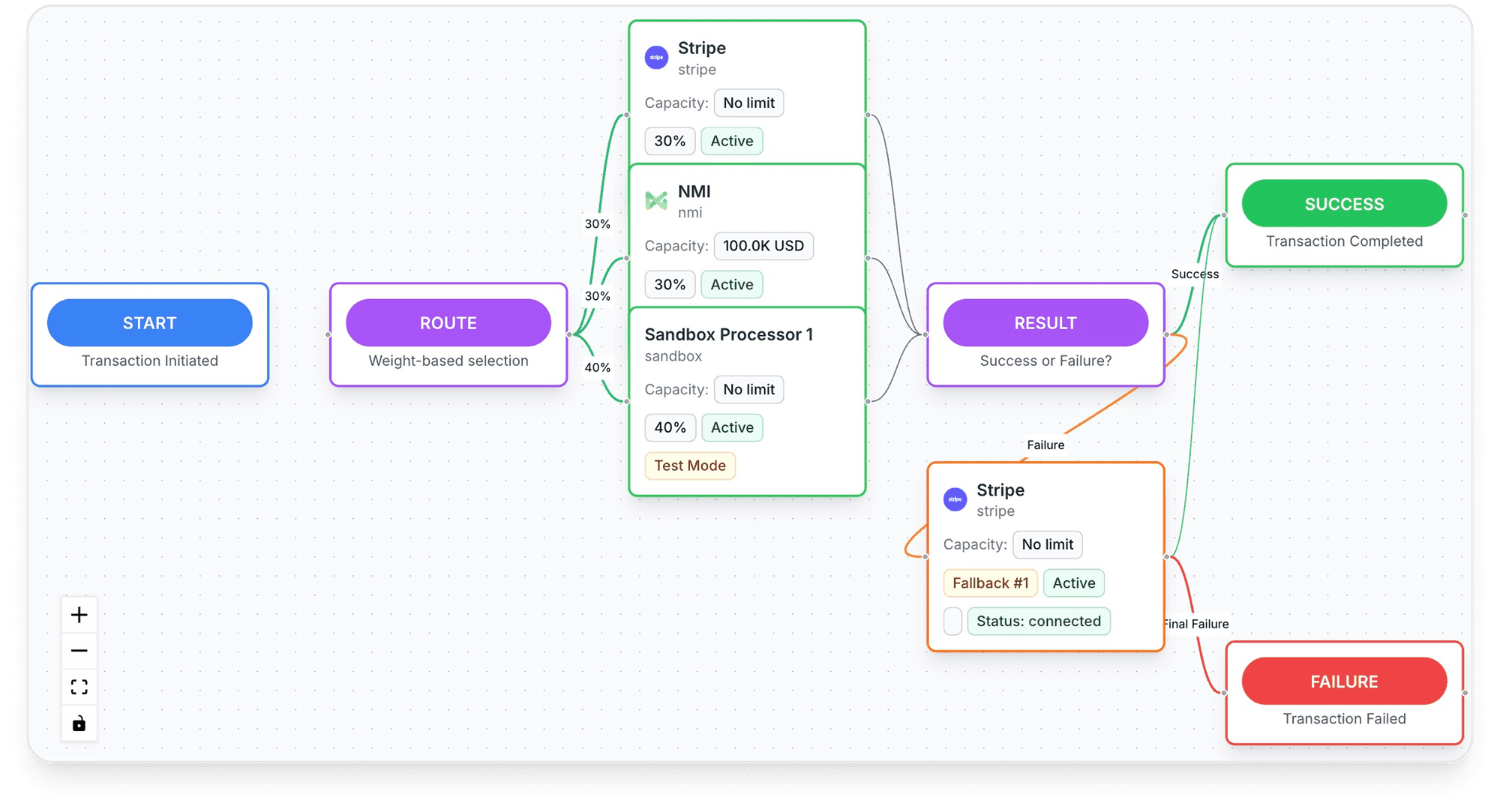
Payment orchestration is software that connects your checkout to several payment processors through one integration. For each payment, it decides which processor handles it, based on rules you set: country, card brand, amount, currency, product or how each processor has been performing. If that processor declines or doesn't answer, the layer can send the payment to another one.
The processors don't go away. Each one still underwrites your business, holds your merchant account, charges its own fees and handles its own disputes. Stripe says so plainly about its own orchestration product: a third-party processor "continues to act as the processor for payments routed to it", and its fees and liability for losses stay under the terms you agreed with it.1Stripe Docs, Orchestration
Fig. 1One checkout, several processors
The layer chooses; the processors still approve or decline.
What a payment orchestration layer does
Vendors package it differently, but the layer always does the same handful of jobs.
Connect
One API for several processors and acquirers. Adding one becomes a configuration task, not a new integration.
Route
Send each payment to a chosen processor by country, card, amount, currency or performance. The logic is detailed in dynamic payment routing.
Retry and fail over
When a processor times out or declines, try again elsewhere, within the card networks' retry rules.
Vault cards
Store saved cards once and use them with any connected processor, so customers don't type their card again.
Authenticate
Run 3D Secure once and pass the result to the processor that authorizes the payment.
Report
One view of approvals, declines and fees across processors, instead of one dashboard per account.
Some layers add fraud screening, local payment methods or subscription billing on top. Those are useful, but they're not what makes a product an orchestrator. The test is simple: can it send the same saved card to two different processors without asking the customer again?
How a payment moves through the layer
- The customer pays. Your checkout collects the card in the provider's form, so the card number goes straight to the vault and you get a token back.
- The layer applies your rules. It reads the card's country and brand, the amount, the currency and anything you attach, then picks a processor.
- Authentication if needed. 3D Secure runs when the rules, the regulation or the issuer require it.
- The processor answers. Approved, declined, or no answer (timeout, outage).
- Retry or stop. A technical failure can go to the next processor. An issuer decline is retried only if the decline code allows it.
- One record. The result is stored in the same format whatever the processor, for reporting and reconciliation.
Steps 4 and 5 are where most of the value, and most of the risk, sit.
What the layer can't do is change the issuer's mind. If the customer's bank refuses the card everywhere, every processor gets the same answer. Orchestration recovers payments lost to a processor (an outage, a weak acquirer for that country, a technical error), not payments refused by the bank. To measure the difference, see what acceptance rate means.
Payment orchestration vs gateway vs PSP vs payment facilitator
These terms get mixed up because some companies are all of them at once. Stripe and Adyen, for example, are gateway, processor and acquirer in one account.
| What it does | Who holds the merchant relationship | Example role | |
|---|---|---|---|
| Payment gateway | Carries payment data from your checkout to a processor and back | The processor or acquirer behind it | The pipe between checkout and processor |
| Payment processor / acquirer | Sends the payment to the card network, gets the issuer's answer, settles funds | The acquirer, under its underwriting | Holds your merchant account and MCC |
| Payment service provider (PSP) | Bundles gateway, processing and often acquiring in one contract | The PSP | One account, one dashboard, one risk team |
| Payment facilitator | Signs up sub-merchants under its own acquirer contract | The payfac, sponsored by its acquirer | Visa defines it as an entity that contracts with an acquirer to deposit transactions or receive settlement on behalf of a sponsored merchant12Visa Core Rules and Visa Product and Service Rules, April 18, 2026 |
| Orchestration layer | Routes payments across several of the above, with a shared vault and reporting | Unchanged: each processor keeps its own | The control layer above the processors |
Verdict
A gateway or PSP processes your payments. An orchestration layer decides which of them processes each payment. You still need at least one processor that has accepted your business, usually two.
Two more terms you'll meet: a merchant of record sells on your behalf and carries the legal liability for the sale, which orchestration doesn't. And a merchant ID (MID) is one merchant account at one acquirer; orchestration often means routing across several MIDs. More on the first two roles in payment gateway vs payment processor and what a payment service provider is.
Retries and failover: what Visa allows
Failover sounds harmless: if one processor says no, ask another. The card rules are stricter than that. Visa's April 2026 rules sort decline codes into categories and set what a merchant may do after each one.12Visa Core Rules and Visa Product and Service Rules, April 18, 2026
- Category 1: pick up card, lost, stolen, closed account, invalid account number, stop paymentThe issuer will never approveNever resubmit for the same card, on any processor
- Category 2: insufficient funds, suspected fraud, issuer unavailable, system malfunctionThe issuer can't approve right nowRetry allowed, up to 20 attempts in 30 days
- Category 3: expired card, wrong CVV2, extra authentication required (Europe)The payment data needs fixingFix the data first, then retry within the same limit
- Category 4: any other codeGeneric declineRetry allowed, up to 20 attempts in 30 days
The second rule matters even more for orchestration:
An Acquirer, a Merchant, a Payment Facilitator, or a VisaNet Processor that reattempts an Authorization Request following a Decline Response […] must not intentionally manipulate any data elements from the original Authorization Request, including, but not limited to, the following: Acquiring Identifier, Acquirer and Merchant country, MCC, POS condition code, POS environment field, POS Entry Mode, Electronic Commerce Indicator.
In practice:
- Technical failures are the safe case. A timeout or a processor outage isn't an issuer decline: no answer came back, so sending the payment elsewhere is plain failover.
- Issuer declines need a decline-code map. Category 1 codes stop the payment everywhere. For the others, count attempts per card across all your processors, not per processor.
- Don't retry to get a different MCC or country. Sending a declined payment to an account with another category code or another merchant country to get it through is exactly what the rule describes.
- Ask your acquirers how they treat a decline retried on another acquirer. The rule lists the acquiring identifier among the fields not to manipulate, so get their reading in writing before you turn on cascading for issuer declines.
Smart retries on subscriptions work the same way: space them out, stop on Category 1 codes, and stay under the cap. Stripe also warns that retrying many cards at once, after a migration for example, "can appear suspicious to issuers".4Stripe Docs, Request a payments data import
Who owns the card data? Tokens, vaults and portability
This is the part that decides whether orchestration is real or cosmetic. When a customer saves a card, the card number is stored somewhere and you get a token that stands for it. Where that number lives decides what you can do with it.
| Token type | Issued by | Usable on another processor? |
|---|---|---|
| Processor token (e.g. a Stripe PaymentMethod) | Your processor, from its own vault | NoOnly that processor can charge it, unless it forwards or exports the card |
| Orchestration vault token | Your orchestration provider or a standalone vault | YesThe vault sends the card number to whichever connected processor you pick |
| Network token | The card network (Visa, Mastercard…), requested by a token requestor | Case by caseIt's tied to a merchant and usually to the provider that requested it |
Processor vaults can forward or export, on request
The big processors don't lock cards in, but they decide the terms:
- Stripe forwarding. Stripe's Vault and Forward API keeps cards in Stripe's vault and sends them to supported endpoints, including Adyen, Braintree, Checkout.com and Worldpay. Access goes through Stripe support. Refunds and disputes on forwarded payments are handled with the other processor, the CVC expires once used, and cards saved with Link are excluded.2Stripe Docs, Forward card details to third-party API endpoints (Vault and Forward)
- Stripe export. Stripe transfers card data only to another PCI DSS Level 1 processor, with its attestation of compliance or Visa registry listing, as an encrypted file of card numbers, customers, emails and metadata. Payment history and subscriptions aren't exported, nor Link cards.3Stripe Docs, Request a payment data export
- Stripe import. The previous processor can take a few days to several weeks to send the file; Stripe then usually imports within 10 business days of receiving correct data.4Stripe Docs, Request a payments data import
- Adyen forwarding. Adyen can forward stored card details, and network tokens, to a PCI-compliant third party such as another PSP, once its support team enables it.8Adyen Docs, Forward payment details
Network tokens don't travel freely
A network token replaces the card number with a value the card network keeps up to date when the card is replaced, which is why it helps recurring billing. Stripe describes it as a credential specific to a card and merchant pair.6Stripe Guides, Understanding the benefits of network tokens EMVCo, which writes the standard, says a token "should not be usable beyond a specific merchant, device or payment scenario".10EMVCo, EMV Payment Tokenisation Adyen's network tokens apply only to payments Adyen acquires: they "cannot be used with external acquirer connections".7Adyen Docs, Network tokenization
So when you move a customer to another processor, the card number moves, and the new processor usually requests its own network token. Keep the card number in a vault you can reach, and treat network tokens as something each processor adds on top. Card updates during a migration also need care: Stripe notes that changes customers make with the old processor between the export and the import are lost.4Stripe Docs, Request a payments data import
Inside Tagada
Move customers between MIDs without re-collecting cards
Tagada's card vault moves customers from one merchant account to another without asking for their card again, and running subscriptions keep charging.
PCI DSS scope with a card vault
Orchestration moves card data around, so PCI DSS comes with it. The PCI SSC's tokenization guidelines set the frame:
All elements of the tokenization system and process, including de-tokenization and PAN storage, are considered part of the cardholder data environment (CDE) and are therefore in scope for PCI DSS.
The same document says tokenization doesn't remove the need to maintain and validate PCI DSS compliance, and that tokens that can be used to start a transaction "might be in scope for PCI DSS" even if they can't reveal the card number.11PCI Security Standards Council, Information Supplement: PCI DSS Tokenization Guidelines, August 2011 For a merchant, that gives three cases:
- The provider's vault holds the cards and its form collects them. Card numbers never touch your servers; most of the burden sits with the provider. Ask for its attestation of compliance.
- You run your own vault. The vault, everything that can de-tokenize and everything connected to it are in your scope.
- Card numbers pass through your servers on the way to a processor. Full scope, whatever the tokens look like afterwards.
Checkout scripts count too: see the PCI section of payment risk management. For the difference between tokens and encryption, see tokenization vs encryption.
3D Secure across several processors
If a different processor can authorize each payment, 3D Secure has to follow. Two processors document how to run it on its own:
- Stripe standalone 3DS runs EMV 3D Secure on Stripe and lets you "authorize the payment with any payment service provider". It's available to businesses on interchange-plus pricing, in the countries where Stripe supports cards except Malaysia and Thailand.5Stripe Docs, Standalone 3DS
- Adyen standalone authentication runs 3D Secure 2 on Adyen; you then "authorize the payment with Adyen, or with another PSP or acquirer". It requires the Advanced flow, not Sessions or Hosted Checkout.9Adyen Docs, Standalone authentication
Authentication and authorization must match
Adyen warns that "refusals often happen when acquirer data mismatches between the authentication and authorization requests", and that cryptograms expire on a schedule set by each card scheme.9Adyen Docs, Standalone authentication If 3D Secure ran with one acquirer's data and the payment fails over to another, expect issuers to refuse it or ask for authentication again.
Stripe's Vault and Forward documentation also points users to support "if you require 3DS authentication across your multiprocessor setup".2Stripe Docs, Forward card details to third-party API endpoints (Vault and Forward) When you compare providers, ask how they handle 3D Secure on a failover. More on exemptions and liability shift in payment authentication.
Who needs payment orchestration, and who doesn't
It usually pays off when
- You already have two processors, or need a second one as backup
- An account review, reserve or closure would stop most of your sales
- You sell in several countries and want local acquiring
- Subscriptions are a large share of revenue and failed renewals hurt
- You want saved cards you can move without asking customers again
It's probably too early when
- You sell in one country, mostly by card
- Your single processor approves well and has never frozen your account
- Nobody on the team will own routing rules and watch the numbers
- Your losses come from offer, pricing or delivery, not from payments
A useful test: list the last three times payments hurt you. If the answer is an outage, a frozen account or a market your processor handled badly, orchestration addresses it. If it's fraud, disputes or checkout abandonment, fix those first: see ecommerce fraud prevention and chargeback prevention.
When processors see your business as higher risk
For brands that processors review closely, orchestration is mostly about continuity. It doesn't make a processor accept you, and it doesn't change your category.
Fig. 2Setting up a second processor
- ApplyEach processor underwrites you on its own
- MCC assignedEach processor sets its own code
- Reserve termsSet per account, read them before going live
- Test trafficA small share of real payments, refunds included
- Live backupReady to take traffic the day you need it
Do it while your record is clean.
- Each account stands alone. Your second processor reviews your business, your history and your dispute record from scratch. Apply before you need it.
- Your MCC follows what you sell, at each processor. Visa's rule above forbids retrying a decline under another MCC. See how to find your MCC on Stripe, Adyen and Shopify and the codes Visa treats as high-risk MCCs.
- Routing doesn't fix a dispute problem. Each acquirer still sees its own disputes, and splitting traffic doesn't remove the cause. Lower the disputes themselves.
- The vault is the insurance. If one account is closed, renewals continue on another only if the saved cards can move. That's the concentration risk covered in payment risk management.
Practical rule
A backup processor you've never sent a payment to isn't a backup. Keep it live with a small, steady share of traffic, and test a refund on it.
Build vs buy
Some teams build routing themselves. It's realistic for a large engineering team with one or two processors; the work grows with every processor and every decline code.
| Build in-house | Your processor's orchestration | Independent orchestration provider | |
|---|---|---|---|
| Card vault | Your own, fully in PCI DSS scope | The processor's vault, forwarded to others | The provider's vault, usable on all connected processors |
| Adding a processor | A new integration each time | Limited to the endpoints the processor supports | A connector, if the provider has it |
| Retry and decline rules | You write and maintain them | The processor's rules engine | The provider's rules engine |
| Disputes and settlement | Each processor's dashboard | Stripe's Orchestration leaves both to the third-party processor1Stripe Docs, Orchestration | Depends on the provider: ask |
| Neutrality | Full | The processor also competes for your volume | Depends on whether the provider also processes |
| Availability | When you've built it | Stripe Orchestration is in private preview, cards only1Stripe Docs, Orchestration | Depends on the provider |
If you build, budget for what never ends: every processor's API changes, decline codes differ from one processor to the next, PCI DSS validation covers your vault every year, and someone has to watch approval rates per processor every week.
Limits and costs of payment orchestration
Fees stack
You pay each processor's fees plus the orchestration fee. Routing by cost only saves money if your processors' prices actually differ.
Disputes stay split
Chargebacks, evidence and settlement stay with the processor that took the payment. Stripe's own orchestration doesn't handle them for third-party processors.
Fraud history splits
Each processor's fraud model sees only the payments sent to it. Keep your own block lists at the checkout.
A new dependency
The layer becomes the single point your checkout relies on. Ask about its uptime, its own failover and how you leave it.
Two more limits. Orchestration doesn't raise approvals on cards the issuer refuses, and it doesn't change your MCC, your reserves or your dispute thresholds. And someone has to run it: rules drift, processors change their behavior, and a rule nobody reviews can quietly send good payments to a weak route.
How to evaluate a payment orchestration provider
| Question to ask | Why it matters |
|---|---|
| Can I export the card data from your vault to a PCI DSS Level 1 processor or vault, and on what terms? | Leaving the orchestrator should be as easy as leaving a processor |
| Which of my current processors and acquirers do you connect to today? | A missing connector is a new project |
| How do you handle Visa Category 1 declines and the 20-attempts-in-30-days cap across processors? | Retries that break card rules put your accounts at risk |
| Do you change any data when you retry a decline on another acquirer? | Visa forbids manipulating the MCC, country or acquiring identifier on a reattempt |
| How does 3D Secure work when a payment fails over? | Mismatched acquirer data leads to refusals |
| Do you request network tokens, and what happens to them when I switch processors? | Network tokens are tied to the merchant and usually to the requestor |
| Do you also process payments yourself? | If so, ask how routing stays neutral |
| What is your attestation of compliance, and what's left in my PCI DSS scope? | You still validate your part |
| Where do refunds, disputes and payouts show up? | Operations still run per processor |
Where Tagada fits
How Tagada helps
Routing, card vault and checkout in one place
Tagada routes payments across Stripe, Adyen and its own TagadaPay processor with one logic, and cascades on decline. Its card vault moves customers between MIDs without re-collecting cards, so running subscriptions keep charging. 3D Secure 2 is native, with device intelligence and a rules engine. The same platform runs the checkout (one-click upsells, order bumps, A/B tests, Apple Pay and Google Pay) and subscriptions with trials, billing cycles, dunning and automatic recovery, standalone or with Shopify, WooCommerce or a headless store. TagadaPay still underwrites each business. Pricing is on the pricing page. Tagada follows Visa and Mastercard rules and the laws that apply to payments.
Whatever you choose, start with one problem: a backup processor for renewals, or one market on a local acquirer. Measure approvals per processor on comparable traffic before you add the next rule.
Frequently asked questions
What is payment orchestration in simple terms?
What is the difference between payment orchestration and a payment gateway?
Do small businesses need payment orchestration?
Can I move my saved cards to another processor?
Does payment orchestration reduce PCI DSS scope?
Is payment orchestration useful for high-risk merchants?
Sources
Checked October 14, 2026- Stripe Docs, Orchestration
- Stripe Docs, Forward card details to third-party API endpoints (Vault and Forward)
- Stripe Docs, Request a payment data export
- Stripe Docs, Request a payments data import
- Stripe Docs, Standalone 3DS
- Stripe Guides, Understanding the benefits of network tokens
- Adyen Docs, Network tokenization
- Adyen Docs, Forward payment details
- Adyen Docs, Standalone authentication
- EMVCo, EMV Payment Tokenisation
- PCI Security Standards Council, Information Supplement: PCI DSS Tokenization Guidelines, August 2011
- Visa Core Rules and Visa Product and Service Rules, April 18, 2026
TagadaPay
One checkout, several processors, your cards in one vault
Tell us what you sell and how you sell it. Each application is underwritten, and approval is not guaranteed.
- 01Tell us what you sell and how
- 02Underwriting reviews your business
- 03Process through TagadaPay alongside your other processors